Showing posts with label web services. Show all posts

Friday, April 1, 2011

Creating Web services

As we all know, it's time to move on Web services. It provides a way of communication over network using two electronic devices.
Well, I had a chance in my project where I was consuming .NET Web services. At that time I was not aware of, how can I prepare my own Web services? Now I come to know the required steps for preparing .NET Web services and I am sharing the same to this post.

Steps to create Web services
As I am going to create .NET Web services for which I need to use a .NET tool which is Microsoft Visual Studio 2005.

In order to create a new web service in VS 2005, please follow the steps below,
  • The figure below shows you the starting page of VS 2005.


  • Go to File >> New >> Web Site as,


  • Select ASP.NET Web Services and click OK.


  •  You will get Services.cs file which you can see in VS 2005. Here you can add your web methods which is similar as public method of your Java classes. Here I have created one 'HelloWorld' web method which you can see in Web service.


  • You need to debug this code. Click the green arrow button in upper middle portion of VS screen. You will get the below pop up message .


  •  You can see your service in browser with supported operations. As I have prepared this service for HelloWorld operation, you can see the same in figure below.


  •  You can now check your operation by clicking the same and check the used soap messages which is interacting with Web service.


  • As you can see in above figure, there is an invoke button. Once you click on this button, the web method will execute and give the result which you have passed in 'HelloWorld' web method in Services.cs file.


  • These are the steps for checking your operations which you have applied on Web services. Now you need to check your Web service which you can find in browser when you append '?WSDL' at the end of service URL which is,  http://localhost:TestWebSite/Service.asmx?WSDL.


  • This is what I am trying to explain you. Now you need to save this file in form .wsdl.


In this way, you can prepare your own services. Also you can go through one of my post Exchange Web services Java Stub to know about Java stub (Client) creation using Axis tool and Eclipse IDE.


    Monday, March 28, 2011

    Exchange Web services Java Stub

    This post illustrates, how to create Java stub using Exchange Web services. Generally stub creation is an easy process since it is available in most of the IDE (Integrated development environment) and you need to use some clicks on IDE and you will get stub (Java source files) available in IDE.
    As of My experience which I have had with Exchange Web services, it is not an easy approach. I had passed around 14 working days to get right Java stub. Here, I am sharing my experience and trying to cover all points which are required for preparing Java stub.

    Required software for creating Java Stub

    Configuring Axis2 tool for Eclipse
    • Download ZIP file named 'axis2-eclipse-codegen-plugin-1.5.4.zip', unzip it and copy the JAR file (inside UNZIP folder) named 'org.apache.axis2.eclipse.codegen.plugin_1.5.4.jar’ inside ‘plugins’ folder of Eclipse.
    • Restart Eclipse IDE.

    Download Exchange 2007 Web-services
    Exchange server provides three XML files which are required for preparing client stub. These files are,

    Services.wsdl- Describes the contract between client and server.
    Messages.xsd- Defines the request and response SOAP messages.
    Types.xsd- Defines the elements that are used in the SOAP messages.

    Use the URLs below for downloading these files,

    • <protocol>://<exchange dns="" fully="" qualified="" server="">:<exchange port="" server="">/EWS/Services.wsdl
    • <protocol>://<exchange dns="" fully="" qualified="" server="">:<exchange port="" server="">/EWS/messages.xsd
    • <protocol>://<exchange dns="" fully="" qualified="" server="">:<exchange port="" server="">/EWS/types.xsd

    Examples are,
    • https://<Exchange server host>/EWS/Services.wsdl
    • https://<Exchange server host>/EWS/messages.xsd
    • https://<Exchange server host>/EWS/types.xsd

    Download files from above links and save it by names. The names are,
    • services.wsdl
    • messages.xsd
    • types.xsd

    Changes needed in Services.wsdl and types.xsd file
    Add the below lines of code in Services.wsdl file just above the last line i.e.

    <wsdl:service name="ExchangeServices">
      <wsdl:port name="ExchangeServicePort" binding="tns:ExchangeServiceBinding">
      <soap:address location="https://<Exchange server host>/EWS/Exchange.asmx"/>
     </wsdl:port>
    </wsdl:service>

    In these lines, you can change following attribute according to your requirement. These are,
    • wsdl service name.
    • wsdl port name.
    • soap location: Represents Exchange.asmx location of Exchange server.

    In types.xsd file, you need to change the definition of element which is used for updating the Exchange server's item. You need to change 'Path' definition to 'FieldURI'. This changes are recommendation by MSDN in which we should pass FieldURI instead of Path in update process.

    Steps used with Eclipse
    • Start Eclipse and create a Java project.
      • Create a ‘wsdl’ folder inside project and copy the Web-services files which you have downloaded in previous point.
        • Create a ‘lib’ folder inside project and copy following JARS.  
            • axiom-api-1.2.10.jar
            • axiom-dom-1.2.10.jar
            • axiom-impl-1.2.10.jar
            • axis2-adb-1.5.4.jar
            • axis2-adb-codegen-1.5.4.jar
            • axis2-codegen-1.5.4.jar
            • axis2-java2wsdl-1.5.4.jar
            • axis2-jibx-1.5.4.jar
            • axis2-kernel-1.5.4.jar
            • axis2-transport-http-1.5.4.jar
            • axis2-transport-local-1.5.4.jar
            • axis2-xmlbeans-1.5.4.jar
            • bcel-5.1.jar
            • commandline.jar
            • commons-codec-1.3.jar
            • commons-fileupload-1.2.jar
            • commons-httpclient-3.1.jar
            • commons-logging-1.1.jar
            • geronimo-jta_1.1_spec-1.1.jar
            • geronimo-ws-metadata_2.0_spec-1.1.2.jar
            • httpcore-4.0.jar
            • javax.mail-1.3.3.01.jar
            • jaxen-1.1.1.jar
            • jibx-bind-1.2.1.jar
            • jibx-run-1.2.1.jar
            • log4j-1.2.14.jar
            • mail.jar
            • neethi-2.0.4.jar
            • regexp-1.2.jar
            • servlet-api-2.3.jar
            • woden-api-1.0M8.jar
            • woden-impl-dom-1.0M8.jar
            • wsdl4j-1.6.2.jar
            • xalan-2.7.0.jar
            • xercesImpl-2.8.1.jar
            • xmlbeans-2.3.0.jar
            • XmlSchema-1.4.3.jar 
        • Project directory structure is shown below.


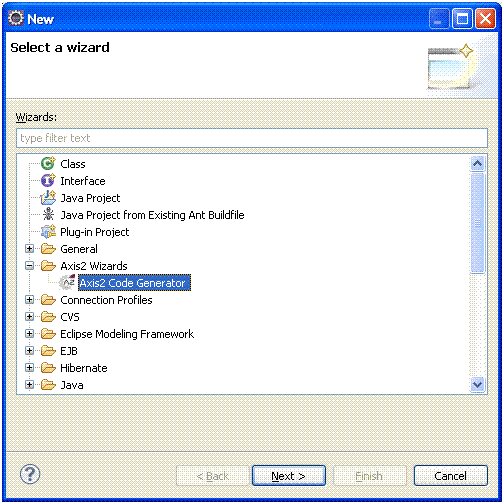
        • Right click on project and click File -> New -> Other -> Axis2 Wizards -> Axis2 Code Generator.


            • Locate ‘Services.wsdl ‘ file and click ‘Next’ button.


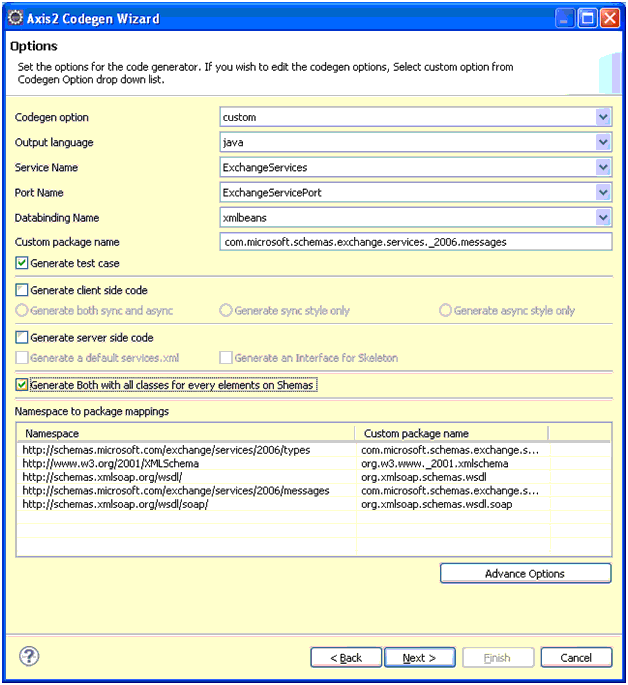
              • Fill the options page in Axis2 Codgen Wizard as Figure below.  Select the options carefully mentioned as figure below,


                • Set the output location of code which is generated by Axis2 tool. Select the options carefully mentioned as figure below.


                  • Finally, you will receive below message if everything is fine.
                    All operation completed.


                    There are some nice links which I have used for Java stub creation.

                    Saturday, March 26, 2011

                    Web services basics

                    Introduction
                    In this topic, I am going to describe some basics of Web-services which needs to understand if you are planning development on Web-services. My main intention is to keep good contents on this post which I found from different notes.

                    The term Web Services refers to the technologies that allow for making connections. Also Services are what you connect together using Web Services. A service is the endpoint of a connection. The combination of services - internal and external to an organization - make up a service-oriented architecture.
                    For example:
                    • VB.NET application can talk to JAVA Web-services and vice versa.
                    • Inventory Web-service can talk to transport Web-service.
                    There are some nice links for understanding Web services basics and its specifications in detail.

                    1. Webo Pedia - Understanding Web Services.
                    2. Rose India - Quick introduction to web services
                    3. Tutorials Point - Web Services.
                    4. Service Architecture - Web Services explained.
                    5. Programming Web services - Web Service Tutorial.

                    About Web-services
                    Web Services allows you to expose the functionality of your existing code over the network. Once it is exposed on the network, other application can use the functionality of your program.
                    A Web service is a unit of managed code that can be remotely invoked using HTTP, that is, it can be activated using HTTP requests.
                    A Web service contains some number of classes, interfaces, enumerations and structures that provide black box functionality to remote clients.
                    In each case, the client indirectly interacts with the Web service through an intervening proxy or client stub. The proxy looks and feels like the real remote type and exposes the same set of methods. Under the hood, the proxy code really forwards the request to the Web service using standard HTTP or optionally SOAP messages.

                    Why we use Web-services?
                    DCOM clients access remote COM types using tightly coupled RPC calls. CORBA requires the use of tightly coupled protocol referred to as Internet Inter-ORB Protocol (IIOP), to activate remote types. Enterprise JavaBeans (EJBs) requires a Remote Method Invocation (RMI) Protocol and by and large a specific language (Java).Thus each of these remote invocation architectures needs proprietary protocols, which typically require a tight connection to the remote source.
                    Web services using nothing but HTTP. Of all the protocols in existence today, HTTP is the one specific wire protocol that all platforms tend to agree on.
                    using Web services, a Web service developer can use any language he wish and a Web service consumer can use standard HTTP to invoke methods a Web service provides. Simple Object Access Protocol (SOAP) and XML are also two key pieces of the Web services architecture.

                    Web Service Standards
                    Web services are registered and announced using the following services and protocols.

                    Universal Description, Discovery, and Integration (UDDI)
                    -- is a protocol for describing available Web services components. This standard allows businesses to register with an Internet directory that will help them advertise their services.

                    Simple Object Access Protocol (SOAP) -- is a protocol for initiating conversations with a UDDI Service. SOAP makes object access simple by allowing applications to invoke object methods or functions, residing on remote servers. SOAP application creates a request block in XML, supplying the data needed by the remote method as well as the location of the remote object itself.

                    Web Service Description Language (WSDL) --, the proposed standard for how a Web service is described, is an XML-based service IDL (Interface Definitition Language) that defines the service interface and its implementation characteristics. WSDL is referenced by UDDI entries and describes the SOAP messages that define a particular Web service.

                    ebXML (e-business XML) -- defines core components, business processes, registry and repository, messaging services, trading partner agreements, and security.

                    Implementing Web Services
                    Here comes a brief step-by-step on how a Web service is implemented.

                    1. A service provider creates a Web service. Please go through one of my post How to create Web services using MS-Visio for creating Web services.
                    2. The service provider uses WSDL to describe the service to a UDDI registry.
                    3. The service provider registers the service in a UDDI registry and/or ebXML registry/repository.
                    4. Another service or consumer locates and requests the registered service by querying UDDI and/or ebXML registries.
                    5. The requesting service or user writes an application to bind the registered service using SOAP in the case of UDDI and/or ebXML.
                    6. Data and messages are exchanged as XML over HTTP.

                    Web Service Infrastructure
                    Even though Web services are being built using existing infrastructure. The core architectural foundation of Web services are XML, XML namespaces, and XML schema. UDDI, SOAP, WSDL, ebXML and security standards are being developed in parallel by different vendors.

                    Web Services Technologies and Tools
                    There are a number of mechanisms for constructing Web services. Microsoft has an exciting tool called Visual Studio .NET in this regard. The back end database can be rational database.

                    Sun Microsystems has its own set of technologies and tools for facilitating Web services development. Java Servlets, Java Server Pages (JSPs), Enterprise JavaBeans (EJB) architecture and other Java 2 Enterprise Edition (J2EE) technologies play a very critical role in developing Web services.
                    There are a number of tools for developing Web services. They are Forte Java IDE, Oracle JDeveloper, and WebGain Studio.
                    Sun Microsystems has taken an initiative called Sun ONE (Open Network Environment) and is planning to push Java forward as a platform for Web services. It is developing Java APIs for XML-based remote procedure calls and for looking up services in XML registries - two more JAX family APIs: JAX/RPC (Java API for XML Remote Procedure Calls) and JAXR (Java API for XML Registries). These will wrap up implementations of Web services standards, such as SOAP and UDDI.

                    IBM also for its part has already developed a suite of early-access tools for Web services development. They are Web Services Toolkit (WSTK), WSDL Toolkit, and Web Services Development Environment (WSDE).

                    Benifits over Web Services
                    Exposing the function on to network - A Web service is a unit of managed code that can be remotely invoked using HTTP,Web Services allows you to expose the functionality of your existing code over the network. Once it is exposed on the network, other application can use the functionality of your program.

                    Connecting Different Applications - Web Services allows different applications to talk to each other and share data and services among themselves. Other applications can also use the services of the web services.

                    Standardized Protocol - Web Services uses standardized industry standard protocol for the communication. All the four layers (Service Transport, XML Messaging, Service Description and Service Discovery layers) uses the well defined protocol in the Web Services protocol stack.

                    Low Cost of communication - Web Services uses SOAP over HTTP protocol for the communication, so you can use your existing low cost internet for implementing Web Services. This solution is much less costly compared to proprietary solutions like EDI/B2B.

                    Support for Other communication means - Web Services can also be implemented using ftp protocol (Web services over FTP).

                    Loosely Coupled Applications -Different applications in different scopes communicate using Web services.

                    Web Services Sharing - These days due to complexness of the business, organizations are using different technologies like EAI, EDI, B2B, Portals etc. for distributing computing. Web Services supports all these technologies, thus helping the business to use existing investments in other technologies.

                    Web Services are Self Describing - Web Services are self describing applications, which reduces the software development time. This helps the other business partners to quickly develop application and start doing business. This helps business to save time and money by cutting development time.

                    Automatic Discovery - Web Services automatic discovery mechanism helps the business to easy find the Service Providers. This also helps your customer to find your services easily. With the help of Web Services your business can also increase revenue by exposing their own Web Services available to others.

                    Business Opportunity - Web Services has opened the door to new business opportunities by making it easy to connect with partners.

                    The Elements of Web Services
                    Web services use XML to code and to decode data, and SOAP to transport it (using open protocols). Besides these, HTTP, Web Services Description Language (WSDL), Universal Description, Discovery and Integration (UDDI), and SPARQL are the elements of Web Services.

                    Uses of Web Services
                    Web services are a set of tools that can be used in a number of ways most commonly in three styles:

                    1. Remote Procedure Calls
                    2. Service-oriented architecture
                    3. Representational state transfer
                    Moreover, it is also used as Reusable application-components and Connect existing software.

                    Friday, March 25, 2011

                    Exchange 2007 Web services

                    Introduction
                    Recently, I had a chance to work on Exchange Web Services (EWS) API for 2007 version. Earlier, I had worked with Exchange 2003 and 2007 server for WebDAV protocol. As of my experience which I have had with Web Services and WebDAV API, Web Services is not an easy task since control is not in your hand. EWS provides a set of XML files through which you can prepare Java client for Exchange server communication. This Java client contains their own set of Java interfaces which needs to understand first for implementing your API. On other hand, WebDAV API controls easily by taking care of Exchange server properties.

                    About Exchange Server
                    Microsoft Exchange server is a server side of client-server model. This is a collaborative application product developed by Microsoft. Exchange's major features are mailing, calendaring, contacts and tasks. Exchange server supports for mobile and web based applications and it is treated as a database storage for collaborative items (Exchange server items).

                    About Exchange Web Services
                    Exchange Web Services is an interface which is used to communicate with Exchange server. This interface is exposed as SOAP (Simple object access protocol) based Web-service, which means requester must send his request in form of XML using SOAP to EWS contained in HTTP post request. EWS itself responds in the same manner using SOAP and XML messages in the HTTP response object. EWS is exposed on a Exchange Client Access Server (CAS) through an ASP.NET Web service. The basic flow of request/response is as follows,


                    For understanding the basics of Web services, please go through my one of post Web services basics.

                    Exchange 2007 Web-services
                    1) Exchange Web Services
                    2) Autodiscover Service
                    3) Unified Messaging Web Service

                    Exchange Web Services
                    Exchange Web Services provides the functionality to enable client applications to communicate with the Exchange server. Exchange Web Services provides access to much of the same data that is made available through Microsoft Office Outlook.

                    Exchange Web Services is described by three files:
                    1) Services.wsdl Describes the contract between client and server.
                    2) Messages.xsd Defines the request and response SOAP messages.
                    3) Types.xsd Defines the elements that are used in the SOAP messages.

                    These schema files are located in the EWS virtual directory of the computer that is running Exchange 2007 that has the Client Access server role installed.

                    Exchange Web Services provides the following types of operations:

                    1) Availability
                    2) Delegate Management (starting with Exchange 2007 Service Pack 1)
                    3) Folder
                    4) Item
                    5) Messaging Records Management
                    6) Notification
                    7) Synchronization
                    8) Utility

                    Autodiscover Service
                    The Autodiscover service provides a mechanism to automatically configure Exchange 2007 client applications to access the Client Access server. Autodiscover provides a powerful tool for configuring client application profiles used to discover Exchange Web Services and associated mailbox information. Autodiscover provides configuration information inside or outside of firewalls. In addition, Autodiscover will work in resource forest and multiple forest scenarios.

                    Unified Messaging Web Service
                    The Unified Messaging Web Service provides an extensibility point for clients to read and change information about Unified Messaging properties.

                    Why we use EWS?
                    As per me, I have worked with WebDAV supported API which supports till Exchange 2007 server. Beyond this versions, Exchange does not support for WebDAV. It supports only for EWS. This is my concern for using EWS.

                    There are some nice links for understanding EWS and its specifications in detail.

                    1) MSDN Getting Started With EWS : Introduction to Exchange 2007 Web Services.
                    2) EWS Operations : A list of the operations that can be performed on the EWS.
                    3) Glen Scales’ Blog : This guy knows Exchange inside and out.
                    4) EWS Basics : Basics of Exchange 2007 Web Services.
                    5) Programming With Exchange Server 2007 : Three part searies of EWS programming.
                    6) Rolf Woll's technical blog : Integrating Java with Exchange

                    Specifications implemented on EWS
                    1) HTTP
                    2) XML
                    3) Simple Object Access Protocol (SOAP)
                    4) Web Services Description Language (WSDL)

                    EWS Architechture
                    The following figure shows how a client application interacts with the Client Access server to access Exchange store information from the Mailbox server.


                    Applications that use Exchange Web Services can access data store items. The applications can access these items locally or remotely by using a SOAP version 1.1 or version 1.2 message. SOAP is an XML-based protocol that is defined in the World Wide Web Consortium (W3C). The SOAP messages are sent between client and server, embedded in an HTTP 1.1 message. The HTTP 1.1 protocol is defined by RFC 2616.

                    Exchange Web Services is deployed with the Client Access server role. Microsoft Exchange Server 2007 clients connect to the computer that is running Exchange 2007 that has the Client Access server role installed in an Active Directory directory service site by using an HTTPS connection.

                    EWS request and response flow
                    The following figure shows the steps involved in sending and receiving XML messages between the client application and the Exchange server.


                    When a client application requests information from the Exchange store, an XML request message that complies with the SOAP standard is created and sent to the Exchange server. When the Microsoft Exchange server receives the request, it verifies the credentials that are provided by the client and automatically parses the XML for the requested data. The server then builds a SOAP response that contains XML data that represents the requested strongly typed objects and their properties. The XML data is sent back to the client application in an HTTP response. The client application then de-serializes the XML and uses the data to reform the strongly typed objects.